JJuma Global logo Developer Docs
Jjuma Pay Documentation

Jjuma Pay Documentation

Payment links, checkout and API integration guide for developers building on the Jjuma Pay platform across Uganda and East Africa.

API base URL: https://api.jjuma.com Dashboard: https://dashboard.jjuma.com Payment: https://pay.jjuma.com
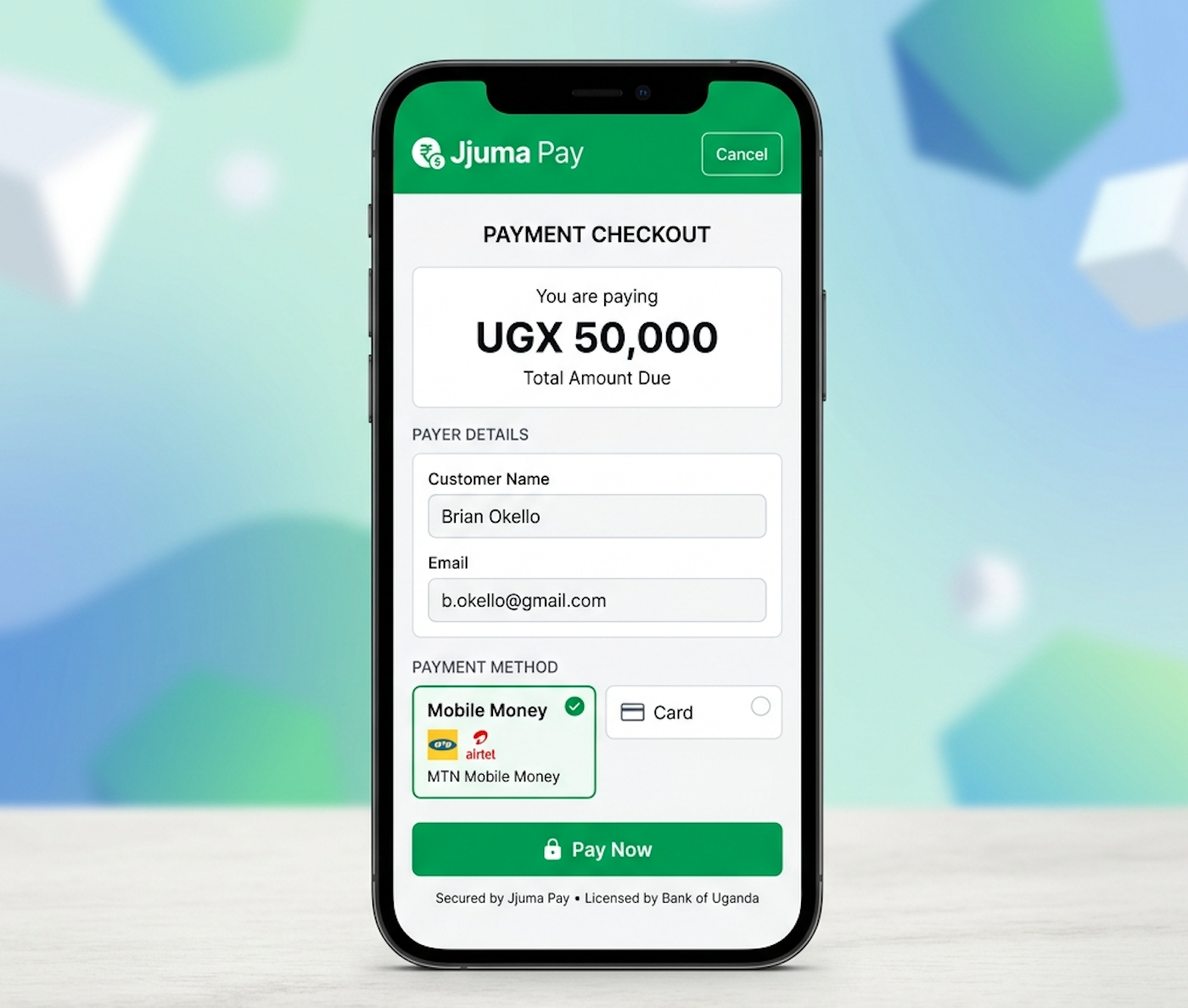
Jjuma Pay documentation preview

API access is available only for verified merchants.

Quick Links

Jump directly into the most common setup and integration topics.

Base URL

API Base

All API requests are sent to https://api.jjuma.com.

Merchant Portal

Dashboard

Use https://dashboard.jjuma.com to create links, review transactions, and manage keys.

What You Can Build

Payment Links

Share a hosted link for school fees, donations, creator support, church giving, and event payments.

Hosted Checkout

Send customers to a secure checkout page where Jjuma Pay handles the payment experience.

Developer API

Authenticate from your backend to manage transactions, link creation, and production integrations.

Important Notes

Verified merchants only API access, payment link creation, and key generation require a verified merchant account.
Keep credentials private Never expose secret API keys inside frontend JavaScript, mobile apps, or public repositories.

Introduction

Jjuma Pay is a payment platform for creators, freelancers, churches, NGOs, schools, and businesses that need a simple and secure payment experience in Uganda and East Africa.

API Base

https://api.jjuma.com

Payment Domain

https://pay.jjuma.com

Getting Started

  1. Create an account in the dashboard.
  2. Verify your email address.
  3. Complete KYC verification.
  4. Create a payment link or generate an API key.
  5. Receive payment and track it in the dashboard.
  6. Receive webhook notifications in your app.

Register or log in to begin.

Authentication

Use Bearer token authorization from your server only. API keys are generated from the dashboard after verification.

HTTP
Authorization: Bearer YOUR_API_KEY
Content-Type: application/json
cURL
curl -X GET https://api.jjuma.com/api/v1/transactions \
  -H "Authorization: Bearer YOUR_API_KEY"
Security Keep keys private, rotate them if exposed, and never commit them to public repositories.

Payments API

Use the payments API to create and verify payments from your backend.

HTTP
POST https://api.jjuma.com/api/v1/payments/create

{
  "amount": 50000,
  "currency": "UGX",
  "description": "Premium content access",
  "customer_name": "John Doe",
  "customer_email": "john@example.com",
  "redirect_url": "https://yourwebsite.com/success",
  "return_url": "https://yourwebsite.com/success",
  "cancel_redirect_url": "https://yourwebsite.com/failed",
  "webhook_url": "https://yourwebsite.com/webhooks/jjuma"
}
  • Required: amount greater than zero, enabled 3-letter ISO currency code, and customer_name.
  • Optional: description, customer email/phone, redirect_url, return_url, cancel_redirect_url, webhook_url, metadata, external order ID, idempotency key, and provider.
  • Currency is case-insensitive, stored uppercase, and rejected when unsupported or disabled in admin settings.
  • Use redirect_url or return_url for the browser Continue flow. Use webhook_url for server-to-server payment updates. callback_url remains a legacy browser-return alias for older integrations.
JSON
{
  "status": "success",
  "data": {
    "transaction_id": "TXN-A1B2C3D4E5F6",
    "reference": "REF-12345678",
    "payment_url": "https://pay.jjuma.com/pay/TXN-A1B2C3D4E5F6",
    "status": "pending"
  }
}

API Keys

API keys are created from the dashboard for verified merchants. Keep secret keys on the server and rotate them if exposure is suspected.

  • Merchant verification is required before key generation.
  • Use test keys for development and live keys for production.
  • Never place secret keys in public repositories or frontend code.

KYC Verification

Verification is required to reduce fraud and unlock payment links, API keys, and production access.

  • Individual accounts can submit ID or passport documents.
  • Business accounts can submit registration and director documents.
  • Pending, rejected, or incomplete verification cannot unlock production features.

Checkout

Hosted checkout runs on pay.jjuma.com and shows the merchant name, amount, description, and supported payment gateways.

URL
https://pay.jjuma.com/p/{slug}
https://pay.jjuma.com/checkout/{reference}

Transactions

Use transaction records to confirm payment status, amount, currency, payer details, and the Jjuma payment reference after a checkout completes.

EndpointPurpose
GET /api/v1/transactionsList the authenticated merchant's transactions.
GET /api/v1/payments/verify/{transaction_id}Verify a payment by transaction ID.

Merchant URLs

Browser redirects and merchant webhooks are different things. Use redirect_url or return_url for the payer's browser, and use webhook_url for your backend to update order status safely.

Redirect / Continue URL

This is the browser-based return path after payment. It should be visible to the customer and safe to open in a browser.

  • Use redirect_url or return_url in API create-payment requests.
  • callback_url is kept as a legacy browser-return alias when older integrations still send it.
  • Normal JJuma payment links continue to https://jjuma.com unless a merchant return URL is present on an API checkout.
JSON
{
  "amount": 50000,
  "currency": "UGX",
  "customer_name": "John Doe",
  "redirect_url": "https://yourwebsite.com/success",
  "return_url": "https://yourwebsite.com/success"
}

Webhook URL

This is a server-to-server notification. JJuma posts to your webhook after a verified payment succeeds or fails, so your system can update orders even if the customer closes the browser.

  • Use webhook_url for payment status updates.
  • Do not rely on the browser redirect alone to mark orders paid.
  • Verify the X-Jjuma-Signature and X-Jjuma-Timestamp headers before updating your database.
  • Return HTTP 200 when the webhook is accepted.
JSON
{
  "event": "payment.completed",
  "event_id": "evt_123",
  "delivery_id": "wh_456",
  "transaction_id": "TXN-A1B2C3D4E5F6",
  "reference": "REF-12345678",
  "tx_ref": "REF-12345678",
  "amount": 50000,
  "currency": "UGX",
  "status": "successful",
  "payment_status": "successful",
  "settlement_status": "waiting_settlement",
  "timestamp": "2026-07-14T10:00:00Z",
  "metadata": { "order_id": "ORD-001" }
}

Payment Status Verification

Your backend can also query JJuma directly to double-check a transaction after the webhook arrives.

  • GET /api/v1/payments/verify/{transaction_id}
  • Use your API key from the server, not from browser JavaScript.
  • Support the existing transaction_id and reference_code lookup flow for older merchants.
HTTP
GET https://api.jjuma.com/api/v1/payments/verify/TXN-A1B2C3D4E5F6
Existing merchant fields keep working: redirect_url, return_url, callback_url, success_url, merchant_site_url, and webhook_url. For browser return use the redirect fields; for status updates use webhook_url.

Webhooks

Configure up to three destinations in Dashboard > Tools > Webhooks. Only active destinations receive their selected events. Use HTTPS in production and keep handlers idempotent.

  • Events: payment.started, payment.completed, payment.failed, payment.cancelled, settlement.pending, settlement.available, settlement.completed, withdrawal.paid.
  • Failed automatic deliveries are attempted up to three times with a 10-second timeout per attempt.
  • Delivery failures do not change a successful payment result; logs and manual retry are available in the dashboard.
  • A request-level webhook_url overrides dashboard destinations for that transaction. If omitted, active dashboard webhooks are used. Browser redirect URLs never replace webhook delivery.
JSON
{
  "event": "payment.completed",
  "event_id": "evt_123",
  "delivery_id": "wh_456",
  "reference": "REF-12345678",
  "amount": 50000,
  "currency": "UGX",
  "status": "successful"
}

Dashboard-managed deliveries use HMAC SHA256 with the exact raw body. Sign X-Jjuma-Timestamp + "." + raw_body using your owner-only webhook secret.

  • X-Jjuma-Signature: sha256=<hex digest> (raw hex is also accepted by the verifier)
  • X-Jjuma-Timestamp
  • X-Jjuma-Event
  • X-Jjuma-Delivery-Id
Node.js
const crypto = require('crypto');
const timestamp = req.get('X-Jjuma-Timestamp') || '';
const supplied = (req.get('X-Jjuma-Signature') || '').replace(/^sha256=/i, '');
const expected = crypto.createHmac('sha256', process.env.JJUMA_WEBHOOK_SECRET)
  .update(timestamp + '.' + req.rawBody.toString('utf8')).digest('hex');
const valid = supplied.length === expected.length &&
  crypto.timingSafeEqual(Buffer.from(supplied, 'hex'), Buffer.from(expected, 'hex'));
PHP
$raw = file_get_contents('php://input');
$timestamp = $_SERVER['HTTP_X_JJUMA_TIMESTAMP'] ?? '';
$signature = preg_replace('/^sha256=/i', '', $_SERVER['HTTP_X_JJUMA_SIGNATURE'] ?? '');
$expected = hash_hmac('sha256', $timestamp . '.' . $raw, getenv('JJUMA_WEBHOOK_SECRET'));
if (!hash_equals($expected, $signature)) { http_response_code(401); exit; }
Python
raw = request.get_data()
timestamp = request.headers.get('X-Jjuma-Timestamp', '')
signature = request.headers.get('X-Jjuma-Signature', '').removeprefix('sha256=')
expected = hmac.new(SECRET.encode(), timestamp.encode() + b'.' + raw, hashlib.sha256).hexdigest()
if not hmac.compare_digest(expected, signature): abort(401)

Regenerating the secret keeps webhook destinations but invalidates the old secret. Request-level transaction webhook URLs do not use the dashboard signing secret.

WooCommerce

WooCommerce integrations should use server-side verification and webhook confirmation before marking orders paid.

  • API Base URL: https://api.jjuma.com
  • API Key
  • Webhook Secret if available
  • Success and cancel URLs

Error Codes

CodeMessage
401Unauthorized
403Forbidden
404Not Found
422Validation Error
500Server Error

SDK Examples

JS
fetch('https://api.jjuma.com/api/v1/payments/create', {
  method: 'POST',
  headers: {
    'Content-Type': 'application/json',
    'Authorization': 'Bearer YOUR_API_KEY'
  }
})

Testing

  1. Create a test payment link.
  2. Open the link on pay.jjuma.com.
  3. Confirm success and failed flows.
  4. Verify dashboard transaction updates.

Going Live

  1. Complete merchant verification.
  2. Set production API keys.
  3. Configure webhook URL.
  4. Test callback URLs and monitor first transactions.

Changelog

  • v1.0 Initial documentation
  • Payment links documentation
  • Hosted checkout documentation
  • API authentication documentation
  • Webhooks documentation
  • WooCommerce integration guide

Integration Guides

Security Never expose your Secret API Key or Webhook Secret in HTML, browser JavaScript, frontend applications, mobile applications, or public repositories. Keep protected credentials on your server.

This section shows a complete PHP integration flow that matches the existing Jjuma Pay API rules, webhook headers, and response format.

Server requirements

  • PHP 7.4 or newer
  • PHP cURL and PHP JSON extensions
  • HTTPS with a valid SSL certificate
  • A public webhook URL
  • Access to your merchant database
  • PHP 8.1 or newer is recommended

Credential types

  • Public API Key: use it for the create-payment request from your server-side checkout flow.
  • Secret API Key: keep it on the server for backend verification and transaction lookup.
  • Webhook Secret: use it only to verify JJuma webhook signatures on your server.

File structure

  • config.php
  • jjuma-client.php
  • pay.php
  • success.php
  • cancel.php
  • webhook.php

PHP Integration

Use this guide when your checkout, return pages, and webhook handler are built in PHP. The browser should be redirected to the hosted Jjuma checkout page, while payment confirmation and order updates must happen on the server.

Recommended flow Create the payment on your server, redirect the customer to the returned payment URL, let the customer return to your success or cancel page, and update your records from the webhook.
File Purpose
config.php Stores API keys, return URLs, webhook URL, and database connection settings.
jjuma-client.php Wraps the JJuma create-payment and verify-payment requests.
pay.php Creates the payment, saves the local record, and redirects the customer to checkout.
success.php Shows the return page and can verify the transaction again from the server.
cancel.php Shows the cancel page and lets the customer retry later.
webhook.php Verifies the webhook signature, prevents duplicates, and updates your database.

1. config.php

Keep your credentials and merchant URLs on the server only.

PHP
<?php
declare(strict_types=1);

define('JJUMA_API_BASE_URL', 'https://api.jjuma.com');
define('JJUMA_PUBLIC_API_KEY', 'bp_live_pub_your_public_key');
define('JJUMA_SECRET_API_KEY', 'YOUR_SECRET_API_KEY');
define('JJUMA_WEBHOOK_SECRET', 'your_webhook_secret');

define('APP_BASE_URL', 'https://merchant.example.com');
define('JJUMA_SUCCESS_URL', APP_BASE_URL . '/success.php');
define('JJUMA_CANCEL_URL', APP_BASE_URL . '/cancel.php');
define('JJUMA_WEBHOOK_URL', APP_BASE_URL . '/webhook.php');

$pdo = new PDO(
  'mysql:host=localhost;dbname=merchant_db;charset=utf8mb4',
  'db_user',
  'db_password',
  [PDO::ATTR_ERRMODE => PDO::ERRMODE_EXCEPTION, PDO::ATTR_DEFAULT_FETCH_MODE => PDO::FETCH_ASSOC]
);

2. jjuma-client.php

This helper keeps your JJuma calls in one place and reuses the documented auth header and response handling.

PHP
<?php
declare(strict_types=1);

final class JjumaClient
{
    private string $apiBaseUrl;
    private string $publicApiKey;
    private string $secretApiKey;

    public function __construct(string $apiBaseUrl, string $publicApiKey, string $secretApiKey)
    {
        $this->apiBaseUrl = $apiBaseUrl;
        $this->publicApiKey = $publicApiKey;
        $this->secretApiKey = $secretApiKey;
    }

    public function createPayment(array $payload): array
    {
        return $this->request('POST', '/api/v1/payments/create', $this->publicApiKey, $payload);
    }

    public function verifyPayment(string $transactionId): array
    {
        return $this->request('GET', '/api/v1/payments/verify/' . rawurlencode($transactionId), $this->secretApiKey);
    }

    private function request(string $method, string $path, string $apiKey, ?array $payload = null): array
    {
        $ch = curl_init($this->apiBaseUrl . $path);
        $headers = [
            'Authorization: Bearer ' . $apiKey,
            'Content-Type: application/json',
            'Accept: application/json',
        ];

        curl_setopt_array($ch, [
            CURLOPT_RETURNTRANSFER => true,
            CURLOPT_CUSTOMREQUEST => $method,
            CURLOPT_HTTPHEADER => $headers,
            CURLOPT_TIMEOUT => 30,
        ]);

        if ($payload !== null) {
            curl_setopt($ch, CURLOPT_POSTFIELDS, json_encode($payload, JSON_UNESCAPED_SLASHES));
        }

        $body = curl_exec($ch);
        if ($body === false) {
            $error = curl_error($ch) ?: 'Unknown cURL error';
            curl_close($ch);
            throw new RuntimeException($error);
        }

        $status = curl_getinfo($ch, CURLINFO_HTTP_CODE);
        curl_close($ch);

        $decoded = json_decode($body, true);
        if (!is_array($decoded)) {
            throw new RuntimeException('JJuma returned invalid JSON.');
        }

        if ($status < 200 || $status >= 300) {
            throw new RuntimeException($decoded['message'] ?? 'JJuma request failed.');
        }

        return $decoded;
    }
}

3. pay.php

Create the payment from your server, store the local record, and redirect the customer to the hosted checkout page.

PHP
<?php
declare(strict_types=1);

require_once __DIR__ . '/config.php';
require_once __DIR__ . '/jjuma-client.php';

$client = new JjumaClient(JJUMA_API_BASE_URL, JJUMA_PUBLIC_API_KEY, JJUMA_SECRET_API_KEY);

$orderId = trim($_POST['order_id'] ?? '');
$payload = [
    'amount' => (int) ($_POST['amount'] ?? 0),
    'currency' => 'UGX',
    'description' => trim($_POST['description'] ?? 'Order payment'),
    'customer_name' => trim($_POST['customer_name'] ?? ''),
    'customer_email' => trim($_POST['customer_email'] ?? ''),
    'customer_phone' => trim($_POST['customer_phone'] ?? ''),
    'redirect_url' => JJUMA_SUCCESS_URL . '?order_id=' . rawurlencode($orderId),
    'return_url' => JJUMA_SUCCESS_URL . '?order_id=' . rawurlencode($orderId),
    'cancel_redirect_url' => JJUMA_CANCEL_URL . '?order_id=' . rawurlencode($orderId),
    'webhook_url' => JJUMA_WEBHOOK_URL,
    'metadata' => ['order_id' => $orderId],
    'external_order_id' => $orderId,
    'idempotency_key' => 'order-' . $orderId,
    'provider' => 'jjuma',
];

$response = $client->createPayment($payload);
$paymentUrl = $response['data']['payment_url'] ?? '';
$transactionId = $response['data']['transaction_id'] ?? '';
$reference = $response['data']['reference'] ?? '';

// Save $transactionId, $reference, and a pending status in your merchant database here.
if ($paymentUrl === '') {
    http_response_code(500);
    exit('Payment URL missing.');
}

header('Location: ' . $paymentUrl);
exit;

4. success.php

Return the customer to your website, then verify the payment again on the server using the stored transaction ID.

PHP
<?php
declare(strict_types=1);

require_once __DIR__ . '/config.php';
require_once __DIR__ . '/jjuma-client.php';

$orderId = trim($_GET['order_id'] ?? '');
// Load the local record by $orderId and fetch the saved transaction_id.
$transactionId = 'TXN-A1B2C3D4E5F6';

$client = new JjumaClient(JJUMA_API_BASE_URL, JJUMA_PUBLIC_API_KEY, JJUMA_SECRET_API_KEY);
$verification = $client->verifyPayment($transactionId);

if (($verification['data']['status'] ?? '') === 'successful') {
    // Mark the order, subscription, package, donation, or balance as paid.
}
?>
<!doctype html>
<html><body>
  <h1>Payment received</h1>
  <p>Thanks for your order. We are confirming the payment on the server.</p>
</body></html>

5. cancel.php

Use the cancel page to show that checkout was closed and that the customer can try again later.

PHP
<?php
declare(strict_types=1);

$orderId = trim($_GET['order_id'] ?? '');
// Update the local record as cancelled or left pending, based on your business rules.
?>
<!doctype html>
<html><body>
  <h1>Checkout cancelled</h1>
  <p>No payment was completed. The customer can return and try again.</p>
</body></html>

6. webhook.php

Use the webhook to keep your merchant records in sync even if the browser is closed after checkout.

PHP
<?php
declare(strict_types=1);

require_once __DIR__ . '/config.php';

$rawBody = file_get_contents('php://input') ?: '';
$timestamp = $_SERVER['HTTP_X_JJUMA_TIMESTAMP'] ?? '';
$signature = preg_replace('/^sha256=/i', '', $_SERVER['HTTP_X_JJUMA_SIGNATURE'] ?? '');
$event = $_SERVER['HTTP_X_JJUMA_EVENT'] ?? '';
$deliveryId = $_SERVER['HTTP_X_JJUMA_DELIVERY_ID'] ?? '';

$expected = hash_hmac('sha256', $timestamp . '.' . $rawBody, JJUMA_WEBHOOK_SECRET);
if (!hash_equals($expected, $signature)) {
    http_response_code(401);
    exit('Invalid signature');
}

$data = json_decode($rawBody, true);
if (!is_array($data)) {
    http_response_code(400);
    exit('Invalid JSON');
}

$eventId = $data['event_id'] ?? '';
$transactionId = $data['transaction_id'] ?? ($data['data']['transaction_id'] ?? '');
$reference = $data['reference'] ?? ($data['data']['reference'] ?? '');

// Skip duplicate event_id, deliveryId, transactionId, or reference values in your database.
// Mark the event as processed before applying business updates.

switch ($event) {
    case 'payment.completed':
        // Mark orders, subscriptions, packages, donations, or balances as paid.
        break;
    case 'payment.failed':
    case 'payment.cancelled':
        // Keep the local record unpaid or cancelled.
        break;
    case 'settlement.completed':
        // If you track wallet balances or settlement status, update them here.
        break;
    case 'withdrawal.paid':
        // Update withdrawal records if your application tracks payouts.
        break;
}

http_response_code(200);
echo 'OK';
Duplicate protection Store the webhook event_id, delivery_id, transaction_id, or reference in a processed-events table and ignore repeats so the same payment cannot update your order twice.

Testing the integration

  1. Use a verified test merchant and a public HTTPS webhook URL.
  2. Create a test payment from pay.php and confirm the customer lands on the hosted checkout page.
  3. Confirm the browser returns to success.php or cancel.php.
  4. Verify the webhook reaches webhook.php with a valid signature.
  5. Send the same webhook again and confirm your duplicate protection ignores it.
  6. Check that orders, subscriptions, packages, donations, or balances update only after the server confirms the payment.

Node.js Integration

Security Never expose your Secret API Key or Webhook Secret in frontend JavaScript, React applications, browser code, mobile applications, or public repositories. Keep protected credentials on your Node.js server.

This guide shows a complete Express integration that creates JJuma payments from your server, redirects customers to hosted checkout, verifies signed webhooks, updates the merchant database once, and keeps duplicate deliveries safe.

Server requirements

  • Node.js with fetch support or another HTTP client
  • npm or another package manager
  • Express
  • HTTPS SSL certificate
  • Public webhook URL
  • Merchant database access
  • Accurate server time

Project files

  • package.json
  • .env
  • .env.example
  • .gitignore
  • src/app.js
  • src/config.js
  • src/jjuma-client.js
  • src/database.js
  • src/routes/payments.js
  • src/routes/webhook.js
  • src/services/order-service.js

Credentials

  • Public API Key for create-payment
  • Secret API Key for server verification
  • Webhook Secret for signature checks

Install packages

bash
npm init -y
npm install express dotenv mysql2

If you use built-in fetch, use a Node.js version that supports it.

package.json

json
{
  "name": "jjuma-node-integration",
  "version": "1.0.0",
  "private": true,
  "type": "module",
  "scripts": {
    "start": "node src/app.js",
    "dev": "node --watch src/app.js"
  }
}

.env.example

env
PORT=3000
JJUMA_API_BASE_URL=https://api.jjuma.com
JJUMA_PUBLIC_KEY=YOUR_PUBLIC_API_KEY
JJUMA_SECRET_KEY=YOUR_SECRET_API_KEY
JJUMA_WEBHOOK_SECRET=YOUR_WEBHOOK_SECRET
MERCHANT_BASE_URL=https://merchantwebsite.com
DEFAULT_CURRENCY=UGX
DB_HOST=localhost
DB_PORT=3306
DB_NAME=merchant_database
DB_USER=merchant_user
DB_PASSWORD=merchant_password

.gitignore

text
node_modules/
.env
npm-debug.log*

src/config.js

js
import 'dotenv/config';

function requireEnvironmentVariable(name) {
  const value = process.env[name]?.trim();
  if (!value) {
    throw new Error('Missing required environment variable: ' + name);
  }
  return value;
}

function requireUrl(name) {
  const value = requireEnvironmentVariable(name);
  try {
    return new URL(value).toString().replace(/\/$/, '');
  } catch {
    throw new Error(name + ' must be a valid URL');
  }
}

const port = Number.parseInt(process.env.PORT || '3000', 10);
if (!Number.isInteger(port) || port < 1 || port > 65535) {
  throw new Error('PORT must be a valid network port');
}

export const config = Object.freeze({
  port,
  jjumaApiBaseUrl: requireUrl('JJUMA_API_BASE_URL'),
  jjumaPublicKey: requireEnvironmentVariable('JJUMA_PUBLIC_KEY'),
  jjumaSecretKey: requireEnvironmentVariable('JJUMA_SECRET_KEY'),
  jjumaWebhookSecret: requireEnvironmentVariable('JJUMA_WEBHOOK_SECRET'),
  merchantBaseUrl: requireUrl('MERCHANT_BASE_URL'),
  defaultCurrency: process.env.DEFAULT_CURRENCY?.trim() || 'UGX',
  database: {
    host: requireEnvironmentVariable('DB_HOST'),
    port: Number.parseInt(process.env.DB_PORT || '3306', 10),
    name: requireEnvironmentVariable('DB_NAME'),
    user: requireEnvironmentVariable('DB_USER'),
    password: requireEnvironmentVariable('DB_PASSWORD')
  }
});

src/jjuma-client.js

js
import { config } from './config.js';

export class JjumaApiError extends Error {
  constructor(message, options = {}) {
    super(message);
    this.name = 'JjumaApiError';
    this.statusCode = options.statusCode;
    this.response = options.response;
  }
}

export async function jjumaRequest({ method, endpoint, accessKey, body, timeoutMs = 60000 }) {
  const url = new URL(endpoint.replace(/^\//, ''), config.jjumaApiBaseUrl + '/');
  const controller = new AbortController();
  const timeout = setTimeout(() => controller.abort(), timeoutMs);

  try {
    const response = await fetch(url, {
      method: method.toUpperCase(),
      headers: {
        Accept: 'application/json',
        'Content-Type': 'application/json',
        Authorization: 'Bearer ' + accessKey
      },
      body: body === undefined ? undefined : JSON.stringify(body),
      signal: controller.signal
    });

    const responseText = await response.text();
    let responseData = {};

    if (responseText) {
      try {
        responseData = JSON.parse(responseText);
      } catch {
        throw new JjumaApiError('JJuma returned an invalid JSON response.', { statusCode: response.status });
      }
    }

    if (!response.ok) {
      const message = responseData.message || responseData.detail || responseData.error || 'The JJuma request failed.';
      throw new JjumaApiError(String(message), { statusCode: response.status, response: responseData });
    }

    return responseData;
  } catch (error) {
    if (error instanceof JjumaApiError) {
      throw error;
    }
    if (error && error.name === 'AbortError') {
      throw new JjumaApiError('The JJuma request timed out.');
    }
    throw new JjumaApiError('The merchant server could not connect to JJuma.');
  } finally {
    clearTimeout(timeout);
  }
}

src/database.js

js
import mysql from 'mysql2/promise';
import { config } from './config.js';

export const database = mysql.createPool({
  host: config.database.host,
  port: config.database.port,
  database: config.database.name,
  user: config.database.user,
  password: config.database.password,
  waitForConnections: true,
  connectionLimit: 10,
  queueLimit: 0,
  charset: 'utf8mb4'
});

Orders table

sql
CREATE TABLE orders (
  id BIGINT UNSIGNED NOT NULL AUTO_INCREMENT,
  order_id VARCHAR(100) NOT NULL,
  customer_id BIGINT UNSIGNED NULL,
  amount DECIMAL(15, 2) NOT NULL,
  currency VARCHAR(10) NOT NULL DEFAULT 'UGX',
  payment_status VARCHAR(30) NOT NULL DEFAULT 'pending',
  jjuma_transaction_id VARCHAR(150) NULL,
  jjuma_reference VARCHAR(150) NULL,
  paid_amount DECIMAL(15, 2) NULL,
  paid_at DATETIME NULL,
  created_at DATETIME NOT NULL DEFAULT CURRENT_TIMESTAMP,
  updated_at DATETIME NOT NULL DEFAULT CURRENT_TIMESTAMP ON UPDATE CURRENT_TIMESTAMP,
  PRIMARY KEY (id),
  UNIQUE KEY unique_order_id (order_id),
  UNIQUE KEY unique_jjuma_transaction_id (jjuma_transaction_id)
);

src/services/order-service.js

js
import { database } from '../database.js';

export async function findOrderByOrderId(orderId) {
  const [rows] = await database.execute(
    'SELECT id, order_id, amount, currency, payment_status, jjuma_transaction_id, jjuma_reference FROM orders WHERE order_id = ? LIMIT 1',
    [orderId]
  );
  return rows[0] || null;
}

export async function markOrderPaidOnce({ orderId, transactionId, reference, amount, currency }) {
  const connection = await database.getConnection();
  try {
    await connection.beginTransaction();
    const [rows] = await connection.execute(
      'SELECT id, order_id, amount, currency, payment_status, jjuma_transaction_id FROM orders WHERE order_id = ? FOR UPDATE',
      [orderId]
    );
    const order = rows[0];
    if (!order) {
      throw new Error('Order not found.');
    }
    if (order.payment_status === 'paid') {
      await connection.commit();
      return { alreadyProcessed: true };
    }
    if (String(order.currency).toUpperCase() !== String(currency).toUpperCase()) {
      throw new Error('Payment currency does not match the order.');
    }
    if (Number(amount) < Number(order.amount)) {
      throw new Error('Payment amount is lower than the order amount.');
    }
    await connection.execute(
      'UPDATE orders SET payment_status = ?, jjuma_transaction_id = ?, jjuma_reference = ?, paid_amount = ?, paid_at = NOW() WHERE id = ?',
      ['paid', transactionId, reference, amount, order.id]
    );
    await connection.commit();
    return { alreadyProcessed: false };
  } catch (error) {
    await connection.rollback();
    throw error;
  } finally {
    connection.release();
  }
}

src/app.js

js
import express from 'express';
import { config } from './config.js';
import { paymentRouter } from './routes/payments.js';
import { webhookRouter } from './routes/webhook.js';

const app = express();
app.disable('x-powered-by');

app.use('/webhooks/jjuma', express.raw({ type: 'application/json', limit: '1mb' }), webhookRouter);
app.use(express.json({ limit: '1mb' }));
app.use(express.urlencoded({ extended: false, limit: '1mb' }));
app.use('/payments', paymentRouter);

app.get('/health', (request, response) => {
  response.status(200).json({ status: 'ok' });
});

app.use((error, request, response, next) => {
  console.error('Application error:', { message: error.message, path: request.path });
  if (response.headersSent) {
    return next(error);
  }
  return response.status(500).json({ message: 'The request could not be completed.' });
});

app.listen(config.port, () => {
  console.log('Merchant application listening on port ' + config.port);
});
Raw body requirement Register express.raw() for the JJuma webhook route before express.json(). If JSON parsing runs first, signature verification can fail.

src/routes/payments.js

js
import { Router } from 'express';
import crypto from 'node:crypto';

import { config } from '../config.js';
import { JjumaApiError, jjumaRequest } from '../jjuma-client.js';
import { findOrderByOrderId } from '../services/order-service.js';

export const paymentRouter = Router();

function escapeHtml(value) {
  return String(value)
    .replaceAll('&', '&amp;')
    .replaceAll('<', '&lt;')
    .replaceAll('>', '&gt;')
    .replaceAll('"', '&quot;')
    .replaceAll("'", '&#039;');
}

paymentRouter.post('/create', async (request, response) => {
  try {
    const orderId = String(request.body.order_id || '').trim();
    if (!orderId || orderId.length > 100) {
      return response.status(400).json({ message: 'A valid order ID is required.' });
    }

    const order = await findOrderByOrderId(orderId);
    if (!order) {
      return response.status(404).json({ message: 'Order not found.' });
    }
    if (String(order.payment_status).toLowerCase() === 'paid') {
      return response.status(409).json({ message: 'This order has already been paid.' });
    }

    const merchantReference = [order.order_id, Date.now(), crypto.randomBytes(6).toString('hex')].join('-');
    const successUrl = new URL('/payments/success', config.merchantBaseUrl);
    successUrl.searchParams.set('order_id', order.order_id);
    const cancelUrl = new URL('/payments/cancel', config.merchantBaseUrl);
    cancelUrl.searchParams.set('order_id', order.order_id);

    const payload = {
      amount: Number(order.amount),
      currency: String(order.currency || 'UGX').toUpperCase(),
      reference: merchantReference,
      description: 'Payment for order ' + order.order_id,
      customer_name: order.customer_name || 'Customer',
      customer_email: order.customer_email || undefined,
      customer_phone: order.customer_phone || undefined,
      redirect_url: successUrl.toString(),
      return_url: successUrl.toString(),
      cancel_redirect_url: cancelUrl.toString(),
      webhook_url: new URL('/webhooks/jjuma', config.merchantBaseUrl).toString(),
      metadata: { order_id: order.order_id },
      external_order_id: order.order_id,
      idempotency_key: 'order-' + order.order_id,
      provider: 'jjuma'
    };

    const result = await jjumaRequest({
      method: 'POST',
      endpoint: '/api/v1/payments/create',
      accessKey: config.jjumaPublicKey,
      body: payload
    });

    const checkoutUrl = result.data?.payment_url || result.payment_url || '';
    const parsedCheckoutUrl = new URL(checkoutUrl);
    if (parsedCheckoutUrl.hostname !== 'pay.jjuma.com') {
      throw new Error('JJuma returned an untrusted checkout URL.');
    }

    return response.redirect(302, parsedCheckoutUrl.toString());
  } catch (error) {
    if (error instanceof JjumaApiError) {
      return response.status(error.statusCode || 502).json({ message: error.message });
    }
    console.error('Create payment error:', { message: error.message });
    return response.status(500).json({ message: 'The payment could not be created.' });
  }
});

paymentRouter.get('/success', (request, response) => {
  const orderId = escapeHtml(request.query.order_id || '');
  return response.status(200).type('html').send(
    '<!DOCTYPE html>' +
    '<html lang="en">' +
    '<head><meta charset="UTF-8"><meta name="viewport" content="width=device-width, initial-scale=1.0"><title>Payment Received</title></head>' +
    '<body><main><h1>Thank you</h1><p>Your payment has been submitted. We are confirming the transaction.</p>' +
    (orderId ? '<p>Order reference: ' + orderId + '</p>' : '') +
    '<a href="/">Continue to website</a></main></body>' +
    '</html>'
  );
});

paymentRouter.get('/cancel', (request, response) => {
  const orderId = escapeHtml(request.query.order_id || '');
  return response.status(200).type('html').send(
    '<!DOCTYPE html>' +
    '<html lang="en">' +
    '<head><meta charset="UTF-8"><meta name="viewport" content="width=device-width, initial-scale=1.0"><title>Payment Cancelled</title></head>' +
    '<body><main><h1>Payment not completed</h1><p>Your payment was not completed. You can return and try again.</p>' +
    (orderId ? '<a href="/payments/retry?order_id=' + encodeURIComponent(orderId) + '">Try again</a>' : '<a href="/">Return to website</a>') +
    '</main></body>' +
    '</html>'
  );
});
Redirects are not payment confirmation The success page only means the customer returned from JJuma checkout. The verified webhook must update wallets, subscriptions, packages, invoices, or orders.

Webhook configuration

  1. Log in to the JJuma dashboard.
  2. Open Tools.
  3. Open Webhooks.
  4. Add the merchant webhook URL.
  5. Choose payment.completed, payment.failed, and payment.cancelled.
  6. Save and enable the webhook.

src/routes/webhook.js

js
import crypto from 'node:crypto';
import { Router } from 'express';

import { config } from '../config.js';
import { markOrderCancelled, markOrderFailed, markOrderPaidOnce } from '../services/order-service.js';

export const webhookRouter = Router();

function getHeader(request, name) {
  const value = request.get(name);
  return value ? value.trim() : '';
}

function secureCompare(expected, received) {
  const expectedBuffer = Buffer.from(expected, 'utf8');
  const receivedBuffer = Buffer.from(received, 'utf8');
  if (expectedBuffer.length !== receivedBuffer.length) {
    return false;
  }
  return crypto.timingSafeEqual(expectedBuffer, receivedBuffer);
}

function extractPaymentDetails(eventData) {
  const data = eventData?.data || eventData || {};
  return {
    eventType: String(eventData?.event || data.event || '').trim(),
    orderId: String(data.order_id || eventData.order_id || data.metadata?.order_id || data.metadata?.woocommerce_order_id || '').trim(),
    transactionId: String(data.transaction_id || eventData.transaction_id || '').trim(),
    reference: String(data.reference || data.tx_ref || eventData.reference || eventData.tx_ref || '').trim(),
    amount: Number(data.amount ?? eventData.amount ?? 0),
    currency: String(data.currency || eventData.currency || 'UGX').trim().toUpperCase(),
    deliveryId: String(data.delivery_id || eventData.delivery_id || '').trim(),
    paymentStatus: String(data.payment_status || eventData.payment_status || data.status || eventData.status || '').trim().toLowerCase(),
    failureReason: String(data.failure_reason || eventData.failure_reason || data.message || eventData.message || '').trim()
  };
}

async function handlePaymentCompleted(eventData) {
  const details = extractPaymentDetails(eventData);
  if (!details.orderId || !details.transactionId || !details.reference || !Number.isFinite(details.amount) || !details.currency) {
    throw new Error('Completed payment event is missing required fields.');
  }
  const result = await markOrderPaidOnce(details);
  return result?.alreadyProcessed ? 'already-processed' : 'processed';
}

async function handlePaymentFailed(eventData) {
  const details = extractPaymentDetails(eventData);
  await markOrderFailed(details);
}

async function handlePaymentCancelled(eventData) {
  const details = extractPaymentDetails(eventData);
  await markOrderCancelled(details);
}

webhookRouter.post('/', async (request, response) => {
  try {
    const signature = getHeader(request, 'X-Jjuma-Signature');
    const timestamp = getHeader(request, 'X-Jjuma-Timestamp');
    if (!signature || !timestamp) {
      return response.status(401).json({ message: 'Missing webhook authentication headers.' });
    }
    if (!Buffer.isBuffer(request.body)) {
      return response.status(400).json({ message: 'The webhook body is invalid.' });
    }
    const eventTime = new Date(timestamp).getTime();
    if (!Number.isFinite(eventTime) || Math.abs(Date.now() - eventTime) > 300000) {
      return response.status(401).json({ message: 'Expired webhook timestamp.' });
    }

    const rawBody = request.body.toString('utf8');
    const receivedSignature = signature.replace(/^sha256=/i, '').trim();
    const expectedSignature = crypto.createHmac('sha256', config.jjumaWebhookSecret).update(timestamp + '.' + rawBody).digest('hex');
    if (!secureCompare(expectedSignature, receivedSignature)) {
      return response.status(401).json({ message: 'Invalid webhook signature.' });
    }

    let event;
    try {
      event = JSON.parse(rawBody);
    } catch {
      return response.status(400).json({ message: 'Invalid webhook JSON.' });
    }

    const eventType = String(event.event || event.data?.event || '').trim();
    switch (eventType) {
      case 'payment.completed':
        await handlePaymentCompleted(event);
        break;
      case 'payment.failed':
        await handlePaymentFailed(event);
        break;
      case 'payment.cancelled':
        await handlePaymentCancelled(event);
        break;
      default:
        console.log('Ignoring unsupported JJuma event:', eventType);
        break;
    }

    return response.status(200).json({ message: 'OK' });
  } catch (error) {
    console.error('JJuma webhook processing failed', { message: error.message });
    return response.status(500).json({ message: 'The webhook could not be processed.' });
  }
});
Duplicate protection and testing Store the webhook event_id, delivery_id, transaction_id, or reference in a processed-events table and ignore repeats so the same payment cannot update your order twice.

Payment verification

js
const result = await jjumaRequest({
  method: 'GET',
  endpoint: '/api/v1/payments/verify/' + transactionId,
  accessKey: config.jjumaSecretKey
});

Use this as a server-side confirmation step. It complements the signed webhook instead of replacing it.

Frontend payment button examples

html
<form action="/payments/create" method="post">
  <input type="hidden" name="order_id" value="ORDER-1001">
  <button type="submit">Pay with JJuma</button>
</form>
js
const response = await fetch('/payments/create', {
  method: 'POST',
  headers: { 'Content-Type': 'application/json' },
  body: JSON.stringify({ order_id: 'ORDER-1001' })
});

Testing checklist

  • Node.js application starts successfully
  • Environment variables are validated
  • Database connection works
  • Payment route accepts a valid order ID
  • Order amount is loaded from the database
  • UGX currency is used correctly
  • JJuma payment request succeeds
  • Checkout URL is validated
  • Customer is redirected to JJuma
  • Success redirect opens correctly
  • Cancel redirect opens correctly
  • Webhook route receives a raw Buffer
  • Valid signature is accepted
  • Invalid signature is rejected
  • Expired timestamp is rejected

Security checklist

  • Keep protected credentials on the Node.js server
  • Never expose the Webhook Secret
  • Never expose the Secret API Key
  • Use HTTPS
  • Verify the raw webhook body
  • Verify the timestamp
  • Use timing safe signature comparison
  • Load the amount from the database
  • Validate currency
  • Validate merchant reference
  • Prevent duplicate processing
  • Use database transactions
  • Use prepared statements
  • Escape HTML output
  • Validate checkout redirect domains
  • Do not log secrets
  • Do not activate services from redirect routes
  • Keep dependencies and Node.js updated